 Twarner491
79 lines
3.7 KiB
Markdown
79 lines
3.7 KiB
Markdown
# AvianVisitors e-ink frame
|
|
|
|
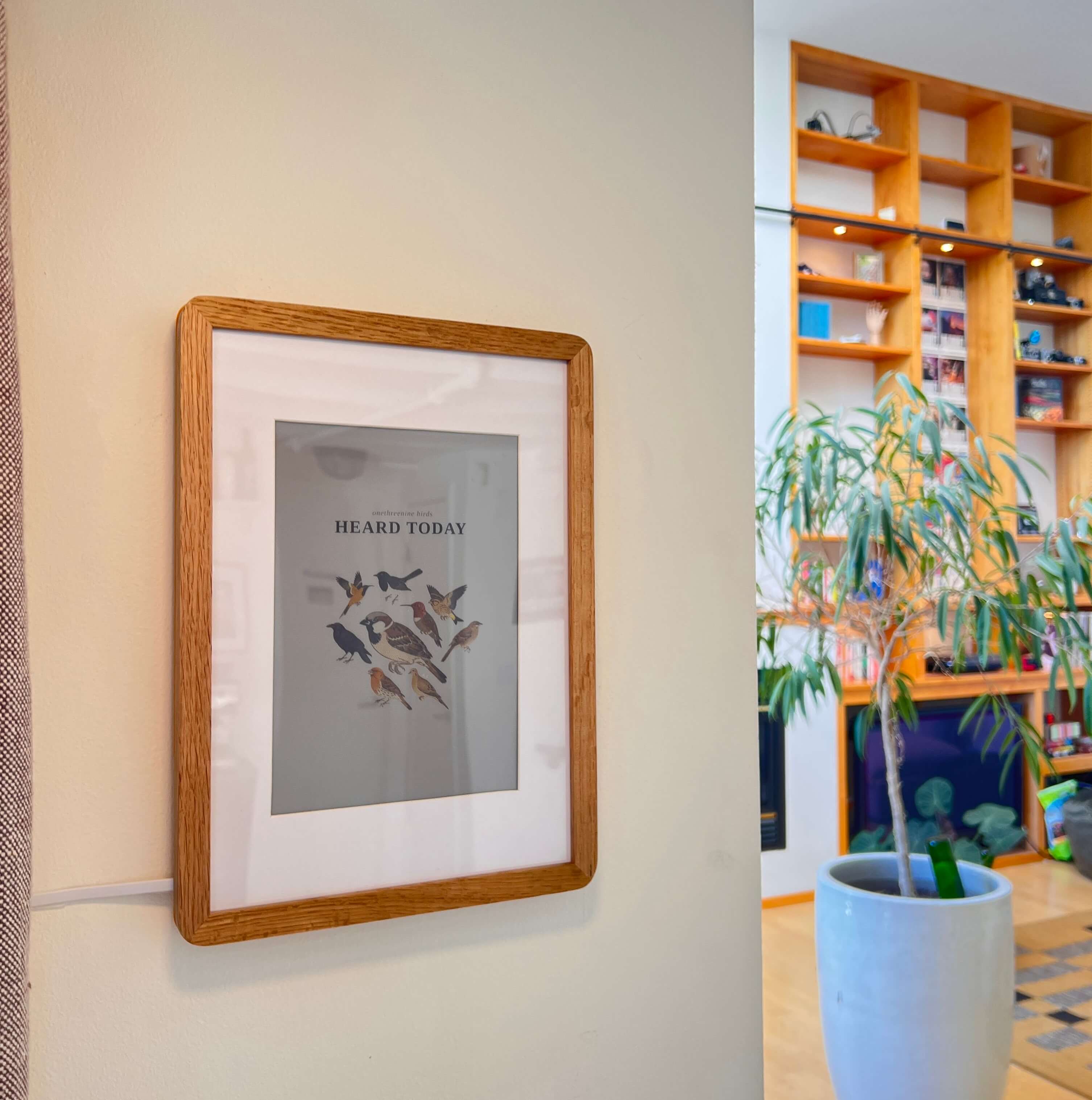
*The last 24h of birds, framed on the wall by your window.*
|
|
|
|
A [Pimoroni Inky Impression 13.3"](https://amzn.to/4xlAWr3) (Spectra 6) mirroring the live collage. A Pi screenshots the site, mats it onto an A5 opening, and pushes to the panel, refreshing only when the birds change. Build one of your own at [theodore.net/projects/AvianVisitors#frame-ous](https://theodore.net/projects/AvianVisitors/#frame-ous).
|
|
|
|
|
|
|
|
---
|
|
|
|
### BOM
|
|
|
|
| Qty | Description | Price | Link |
|
|
|-----|-------------|-------|------|
|
|
| 1 | Raspberry Pi 3 A+ or Zero 2 W | ~$25-35 | [Amazon](https://amzn.to/49Xp58I) |
|
|
| 1 | 13.3" E Ink Display | $299.99 | [Amazon](https://amzn.to/4xlAWr3) |
|
|
| 1 | A4 Wood Photo Frame | $21.99 | [Amazon](https://amzn.to/3RWFbJE) |
|
|
| 1 | Long, Flat Micro USB Cable | $7.99 | [Amazon](https://a.co/d/0a59rKSk) |
|
|
| 1 | Flat USB Brick | $7.59 | [Amazon](https://amzn.to/3S4CtSs) |
|
|
| | **Total** | **~$365** | | |
|
|
|
|
The 3 A+ and Zero 2 W are both tested and set up identically; any Pi with the 40-pin header that runs 64-bit Raspberry Pi OS works. The printed backing pressure-fits either board.
|
|
|
|
CAD + 3d print files can be found in [`hardware/`](hardware/).
|
|
|
|
### Kits
|
|
|
|
I offer the frame and the bird mic as separate electronics kits. I put up a store for some of my open-source projects and will soon be able to offer kits cheaper than buying all the components individually, once I start buying in bulk.
|
|
|
|
- [Frame kit](https://theodore.net/store/avian-visitors/)
|
|
- [Bird mic kit](https://theodore.net/store/avian-mic/)
|
|
|
|
---
|
|
|
|
## 1. Flash the SD card
|
|
|
|
Flash an sd card with Raspberry Pi OS Lite (64-bit) via [Raspberry Pi Imager](https://www.raspberrypi.com/software/). In the customisation dialog set:
|
|
|
|
- Username
|
|
- WiFi SSID + password
|
|
- Hostname: `birdpic`
|
|
- Enable SSH with password auth
|
|
|
|
Then install in Pi and power up.
|
|
|
|
## 2. Run the installer
|
|
|
|
```bash
|
|
ssh <your-username>@birdpic.local
|
|
sudo apt update && sudo apt install -y git
|
|
git clone https://github.com/Twarner491/AvianVisitors
|
|
cd AvianVisitors/frame
|
|
```
|
|
|
|
Pick how the frame gets its birds:
|
|
|
|
```bash
|
|
# Pair with your bird mic on the same network (birdnet.local). The default.
|
|
./install.sh
|
|
|
|
# No microphone: draw the collage from BirdWeather for any ZIP code.
|
|
./install.sh --bird-weather --zip 94107
|
|
|
|
# Bird mic hosted at a public URL: point the frame straight at it.
|
|
./install.sh --image-url https://bird.onethreenine.net/frame.png?k=YOUR_FRAME_KEY
|
|
```
|
|
|
|
Each one enables SPI + I2C, installs the deps and a systemd timer, writes `~/.birdframe/config.toml`, and reboots once to bring SPI up. Full options live in [`config.example.toml`](config.example.toml).
|
|
|
|
BirdWeather mode renders on the Pi from this repo's illustrations on GitHub, so there is no image set to copy over. ZIP codes with no station nearby fall back to the closest ones. If you are far from any BirdWeather station, add `--ebird-key <key>` (a free key from [ebird.org/api/keygen](https://ebird.org/api/keygen)) and the frame fills from eBird sightings instead.
|
|
|
|
The bundled illustrations center on the western U.S. If birds near your ZIP aren't in the set you cloned, the installer flags them and the frame skips them until they exist. To generate them, run [`generate_illustrations.py`](generate_illustrations.py) on a laptop or workstation (it uses the same rembg cutout as the rest of the pipeline, which the Pi can't fit in memory), passing your ZIP and a paid Google Gemini key, then commit the new cutouts or copy them to the Pi:
|
|
|
|
```bash
|
|
python3 generate_illustrations.py --zip 10001 --gemini-key YOUR_GEMINI_KEY
|
|
```
|
|
|
|
It generates only the species you're missing; `--country` and `--sample` carry through for non-US postcodes or a wider region.
|