# AvianVisitors
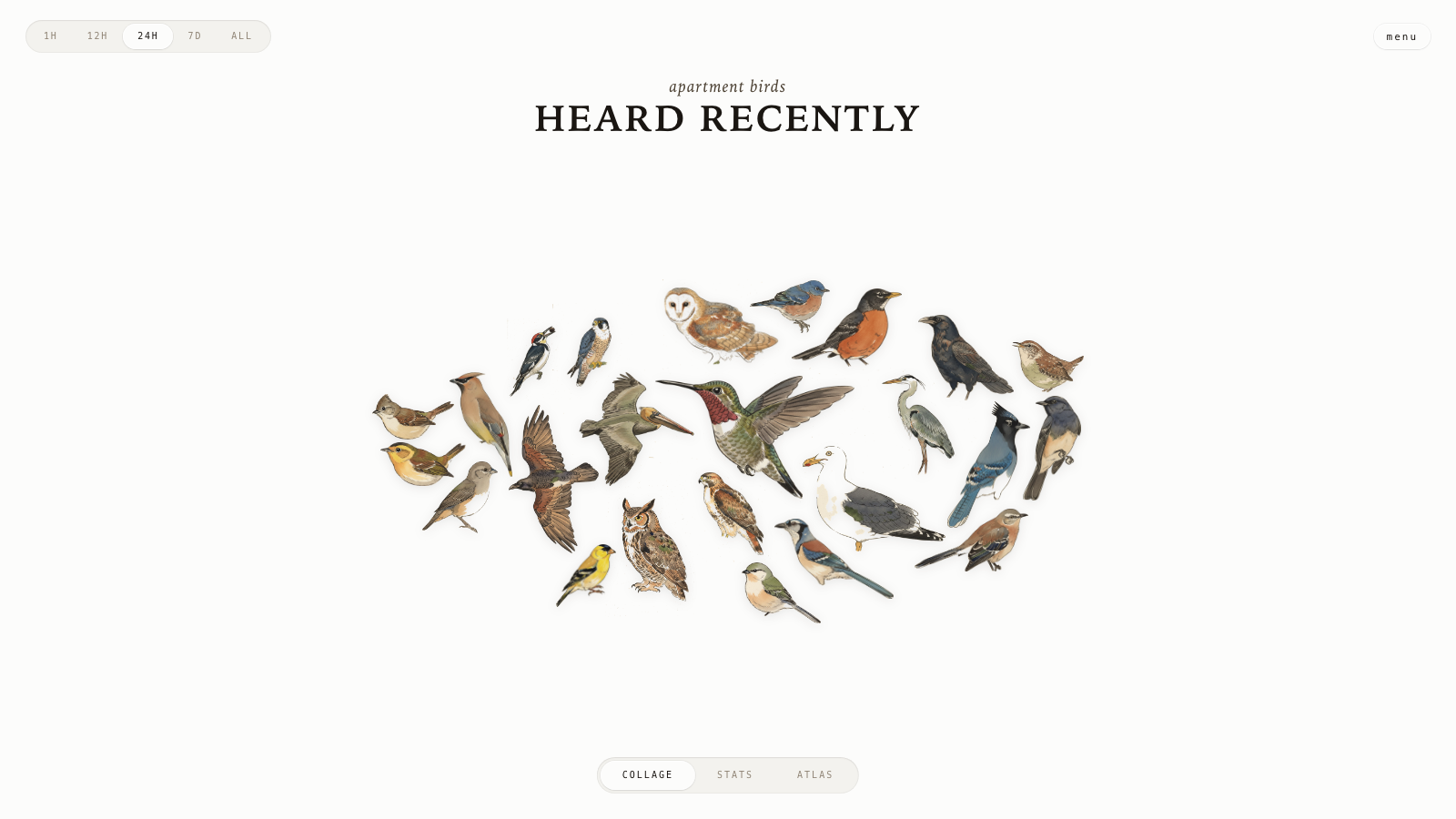
*A live bird collage from your window.*
See it running at [bird.onethreenine.net](https://bird.onethreenine.net).
 ---
## BOM
| Qty | Description | Price | Link | Notes |
|-----|-------------|-------|------| ----- |
| 1 | Raspberry Pi (4B / 5 / Zero 2W) | ~$35-80 | [Raspberry Pi](https://www.raspberrypi.com/products/) | [See note for RPi20](https://github.com/mcguirepr89/BirdNET-Pi/wiki/RPi0W2-Installation-Guide) |
| 1 | Micro SD Card (≥32 GB) | ~$10 | [Amazon](https://www.amazon.com/s?k=32gb+micro+sd+card&i=electronics&crid=1RCJAD1J0EPDX&sprefix=32gb+micro+sd+card%2Celectronics%2C226&ref=nb_sb_noss_1) | |
| 1 | USB lavalier microphone | $16.95 | [Amazon](https://www.amazon.com/dp/B0176NRE1G) | |
| 1 | Pi power supply | ~$10 | - | |
Optional: a [Gemini API key](https://aistudio.google.com/apikey) to restyle illustrations, an [eBird API key](https://ebird.org/api/keygen) to filter species by region.
---
## 1. Flash the SD card
Use [Raspberry Pi Imager](https://www.raspberrypi.com/software/). Pick Raspberry Pi OS Lite (64-bit). In the customisation dialog set:
- Username
- WiFi SSID + password
- Hostname: `birdnet`
- Enable SSH with password auth
Plug the USB mic into the Pi. Place the capsule in a window or mount it outside. Boot.
---
## 2. Run the installer
Installer assumes passwordless sudo (Raspberry Pi OS Lite default - if you've tightened it, run `sudo raspi-config` -> *System Options* -> restore the default first).
```bash
ssh @birdnet.local
curl -s https://raw.githubusercontent.com/Twarner491/AvianVisitors/avian-visitors/newinstaller.sh | bash
```
Clones this fork, installs BirdNET-Pi, symlinks the AvianVisitors overlay into the Caddy web root. Takes 20-40 minutes. Reboots when done.
Collage: `http://birdnet.local/`. Stock BirdNET-Pi UI: `http://birdnet.local/index.php`. The menu button in the top right opens an admin overlay with settings, system, log, and tool panels.
---
## 3. (Optional) Restyle the illustrations
The repo ships with 450 bundled illustrations. To restyle or add region-specific species:
```bash
export GEMINI_API_KEY='your-key'
# Re-render every species in BirdNET-Pi's model:
python3 ~/BirdNET-Pi/avian/scripts/pregen.py --labels ~/BirdNET-Pi/model/labels.txt --force
# Or filter to species observed in your eBird region:
export EBIRD_API_KEY='your-key'
python3 ~/BirdNET-Pi/avian/scripts/pregen.py \
--labels ~/BirdNET-Pi/model/labels.txt \
--ebird-region US-CA
```
Style lives in [`avian/scripts/prompt.template.md`](avian/scripts/prompt.template.md). Edit, re-run with `--force`.
---
## 4. (Optional) Forward off your LAN
See [`avian/forwarding/`](avian/forwarding/) for three independent recipes:
- **Cloudflare Tunnel** for a public HTTPS URL.
- **Home Assistant REST sensor** that exposes the latest detection.
- **MQTT bridge** that publishes every new detection.
---
## Repo layout
```
avian/ # everything we add to BirdNET-Pi
├── frontend/ # static HTML/JS/CSS for the collage
├── assets/ # 450 bundled illustrations + cutouts + masks
├── api/ # PHP shims served by BirdNET-Pi's PHP-FPM
├── scripts/ # pregen.py + editable prompt template
└── forwarding/ # optional HA / MQTT / Cloudflare configs
```
Everything outside `avian/` is upstream BirdNET-Pi.
---
## License
CC-BY-NC-SA-4.0, inherited from [BirdNET-Pi](https://github.com/Nachtzuster/BirdNET-Pi/blob/main/LICENSE). Non-commercial use only. See the [BirdNET-Pi README](https://github.com/Nachtzuster/BirdNET-Pi/blob/main/README.md) for full Cornell attribution.
---
- [Fork this repository](https://github.com/Twarner491/AvianVisitors/fork)
- [Watch this repo](https://github.com/Twarner491/AvianVisitors/subscription)
- [Create issue](https://github.com/Twarner491/AvianVisitors/issues/new)
---
## BOM
| Qty | Description | Price | Link | Notes |
|-----|-------------|-------|------| ----- |
| 1 | Raspberry Pi (4B / 5 / Zero 2W) | ~$35-80 | [Raspberry Pi](https://www.raspberrypi.com/products/) | [See note for RPi20](https://github.com/mcguirepr89/BirdNET-Pi/wiki/RPi0W2-Installation-Guide) |
| 1 | Micro SD Card (≥32 GB) | ~$10 | [Amazon](https://www.amazon.com/s?k=32gb+micro+sd+card&i=electronics&crid=1RCJAD1J0EPDX&sprefix=32gb+micro+sd+card%2Celectronics%2C226&ref=nb_sb_noss_1) | |
| 1 | USB lavalier microphone | $16.95 | [Amazon](https://www.amazon.com/dp/B0176NRE1G) | |
| 1 | Pi power supply | ~$10 | - | |
Optional: a [Gemini API key](https://aistudio.google.com/apikey) to restyle illustrations, an [eBird API key](https://ebird.org/api/keygen) to filter species by region.
---
## 1. Flash the SD card
Use [Raspberry Pi Imager](https://www.raspberrypi.com/software/). Pick Raspberry Pi OS Lite (64-bit). In the customisation dialog set:
- Username
- WiFi SSID + password
- Hostname: `birdnet`
- Enable SSH with password auth
Plug the USB mic into the Pi. Place the capsule in a window or mount it outside. Boot.
---
## 2. Run the installer
Installer assumes passwordless sudo (Raspberry Pi OS Lite default - if you've tightened it, run `sudo raspi-config` -> *System Options* -> restore the default first).
```bash
ssh @birdnet.local
curl -s https://raw.githubusercontent.com/Twarner491/AvianVisitors/avian-visitors/newinstaller.sh | bash
```
Clones this fork, installs BirdNET-Pi, symlinks the AvianVisitors overlay into the Caddy web root. Takes 20-40 minutes. Reboots when done.
Collage: `http://birdnet.local/`. Stock BirdNET-Pi UI: `http://birdnet.local/index.php`. The menu button in the top right opens an admin overlay with settings, system, log, and tool panels.
---
## 3. (Optional) Restyle the illustrations
The repo ships with 450 bundled illustrations. To restyle or add region-specific species:
```bash
export GEMINI_API_KEY='your-key'
# Re-render every species in BirdNET-Pi's model:
python3 ~/BirdNET-Pi/avian/scripts/pregen.py --labels ~/BirdNET-Pi/model/labels.txt --force
# Or filter to species observed in your eBird region:
export EBIRD_API_KEY='your-key'
python3 ~/BirdNET-Pi/avian/scripts/pregen.py \
--labels ~/BirdNET-Pi/model/labels.txt \
--ebird-region US-CA
```
Style lives in [`avian/scripts/prompt.template.md`](avian/scripts/prompt.template.md). Edit, re-run with `--force`.
---
## 4. (Optional) Forward off your LAN
See [`avian/forwarding/`](avian/forwarding/) for three independent recipes:
- **Cloudflare Tunnel** for a public HTTPS URL.
- **Home Assistant REST sensor** that exposes the latest detection.
- **MQTT bridge** that publishes every new detection.
---
## Repo layout
```
avian/ # everything we add to BirdNET-Pi
├── frontend/ # static HTML/JS/CSS for the collage
├── assets/ # 450 bundled illustrations + cutouts + masks
├── api/ # PHP shims served by BirdNET-Pi's PHP-FPM
├── scripts/ # pregen.py + editable prompt template
└── forwarding/ # optional HA / MQTT / Cloudflare configs
```
Everything outside `avian/` is upstream BirdNET-Pi.
---
## License
CC-BY-NC-SA-4.0, inherited from [BirdNET-Pi](https://github.com/Nachtzuster/BirdNET-Pi/blob/main/LICENSE). Non-commercial use only. See the [BirdNET-Pi README](https://github.com/Nachtzuster/BirdNET-Pi/blob/main/README.md) for full Cornell attribution.
---
- [Fork this repository](https://github.com/Twarner491/AvianVisitors/fork)
- [Watch this repo](https://github.com/Twarner491/AvianVisitors/subscription)
- [Create issue](https://github.com/Twarner491/AvianVisitors/issues/new)