# AvianVisitors
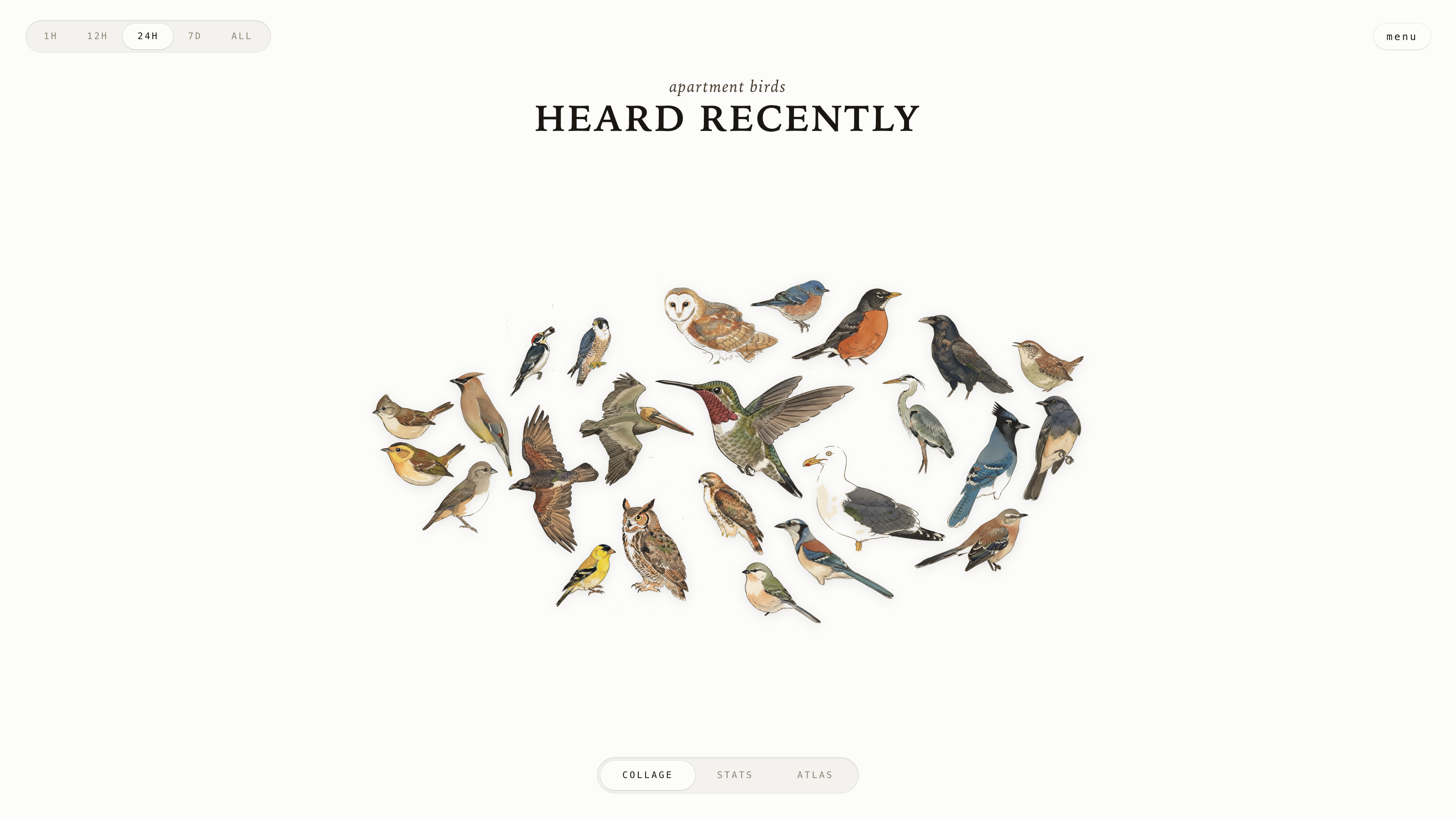
*A live bird collage from your apartment window.*
A fork of [BirdNET-Pi](https://github.com/Nachtzuster/BirdNET-Pi) that adds a tile-packed kachō-e collage UI. Listens to your balcony with Cornell's [BirdNET](https://birdnet.cornell.edu/), illustrates every detected species in the style of Edo-period Japanese woodblock prints, and renders them sized by call count. See it running at [bird.onethreenine.net](https://bird.onethreenine.net).
 ---
## BOM
| Qty | Description | Price | Link |
|-----|-------------|-------|------|
| 1 | Raspberry Pi (4B / 5 / Zero 2W) | ~$35–80 | [Raspberry Pi](https://www.raspberrypi.com/products/) |
| 1 | Micro SD Card (≥32 GB) | ~$10 | [Amazon](https://a.co/d/08aiL8c) |
| 1 | USB lavalier microphone | $14.99 | [Amazon](https://www.amazon.com/dp/B0176NRE1G) |
| 1 | Pi power supply | ~$10 | — |
Optional: a [Gemini API key](https://aistudio.google.com/apikey) (free tier covers a regional regen) for restyling or adding species, and an [eBird API key](https://ebird.org/api/keygen) for filtering the species list to your area.
---
## 1. Flash the SD card
Use [Raspberry Pi Imager](https://www.raspberrypi.com/software/). Pick **Raspberry Pi OS Lite (64-bit)**. In the customisation dialog, set:
- Username (your choice — the installer uses whatever you pick)
- WiFi SSID + password
- Hostname: `birdnet` (so it's reachable at `birdnet.local`)
- Enable SSH with password auth
Boot the Pi.
---
## 2. Run the installer
SSH in and run one command:
```bash
ssh @birdnet.local
curl -s https://raw.githubusercontent.com/Twarner491/AvianVisitors/avian-visitors/newinstaller.sh | bash
```
The installer clones this fork, sets up BirdNET-Pi (audio capture, model, web UI), and symlinks the AvianVisitors overlay into the Caddy web root. Takes 20–40 minutes. The Pi reboots when done.
Open `http://birdnet.local/avian/` from any device on your network. The BirdNET-Pi stock UI sits at `http://birdnet.local/`.
---
## 3. (Optional) Restyle the illustrations
The repo ships with 450 bundled illustrations covering most North-American species. To change the visual style or add region-specific birds:
```bash
export GEMINI_API_KEY='your-gemini-key'
# Re-render every species in BirdNET-Pi's model:
python3 ~/BirdNET-Pi/avian/scripts/pregen.py --labels ~/BirdNET-Pi/model/labels.txt --force
# Or only species eBird has observed in your region:
export EBIRD_API_KEY='your-ebird-key'
python3 ~/BirdNET-Pi/avian/scripts/pregen.py \
--labels ~/BirdNET-Pi/model/labels.txt \
--ebird-region US-CA # state, or US-CA-085 for a county
```
Style is a single editable file at [`avian/scripts/prompt.template.md`](avian/scripts/prompt.template.md). Replace the body, re-run pregen with `--force`, done.
---
## 4. (Optional) Forward off your LAN
See [`avian/forwarding/`](avian/forwarding/) for three independent recipes:
- **Cloudflare Tunnel** — public HTTPS URL, no port forwarding, optional Cloudflare Access password gate.
- **Home Assistant REST sensor** — surfaces the latest detection for automations.
- **MQTT bridge** — publishes every new detection as JSON.
---
## Repo layout
```
avian/ # everything we add to BirdNET-Pi
├── frontend/ # static HTML/JS/CSS for the collage
├── assets/ # 450 bundled illustrations + cutouts + masks
├── api/ # PHP shims served by BirdNET-Pi's PHP-FPM
├── scripts/ # pregen.py + editable prompt template
└── forwarding/ # optional HA / MQTT / Cloudflare configs
```
Everything outside `avian/` is upstream BirdNET-Pi.
---
## License
CC-BY-NC-SA-4.0, inherited from [BirdNET-Pi's upstream license](https://github.com/Nachtzuster/BirdNET-Pi/blob/main/LICENSE). Non-commercial use only; share-alike on derivatives. See the [BirdNET-Pi README](https://github.com/Nachtzuster/BirdNET-Pi/blob/main/README.md) for the full Cornell attribution.
---
- [Fork this repository](https://github.com/Twarner491/AvianVisitors/fork)
- [Watch this repo](https://github.com/Twarner491/AvianVisitors/subscription)
- [Create issue](https://github.com/Twarner491/AvianVisitors/issues/new)
---
## BOM
| Qty | Description | Price | Link |
|-----|-------------|-------|------|
| 1 | Raspberry Pi (4B / 5 / Zero 2W) | ~$35–80 | [Raspberry Pi](https://www.raspberrypi.com/products/) |
| 1 | Micro SD Card (≥32 GB) | ~$10 | [Amazon](https://a.co/d/08aiL8c) |
| 1 | USB lavalier microphone | $14.99 | [Amazon](https://www.amazon.com/dp/B0176NRE1G) |
| 1 | Pi power supply | ~$10 | — |
Optional: a [Gemini API key](https://aistudio.google.com/apikey) (free tier covers a regional regen) for restyling or adding species, and an [eBird API key](https://ebird.org/api/keygen) for filtering the species list to your area.
---
## 1. Flash the SD card
Use [Raspberry Pi Imager](https://www.raspberrypi.com/software/). Pick **Raspberry Pi OS Lite (64-bit)**. In the customisation dialog, set:
- Username (your choice — the installer uses whatever you pick)
- WiFi SSID + password
- Hostname: `birdnet` (so it's reachable at `birdnet.local`)
- Enable SSH with password auth
Boot the Pi.
---
## 2. Run the installer
SSH in and run one command:
```bash
ssh @birdnet.local
curl -s https://raw.githubusercontent.com/Twarner491/AvianVisitors/avian-visitors/newinstaller.sh | bash
```
The installer clones this fork, sets up BirdNET-Pi (audio capture, model, web UI), and symlinks the AvianVisitors overlay into the Caddy web root. Takes 20–40 minutes. The Pi reboots when done.
Open `http://birdnet.local/avian/` from any device on your network. The BirdNET-Pi stock UI sits at `http://birdnet.local/`.
---
## 3. (Optional) Restyle the illustrations
The repo ships with 450 bundled illustrations covering most North-American species. To change the visual style or add region-specific birds:
```bash
export GEMINI_API_KEY='your-gemini-key'
# Re-render every species in BirdNET-Pi's model:
python3 ~/BirdNET-Pi/avian/scripts/pregen.py --labels ~/BirdNET-Pi/model/labels.txt --force
# Or only species eBird has observed in your region:
export EBIRD_API_KEY='your-ebird-key'
python3 ~/BirdNET-Pi/avian/scripts/pregen.py \
--labels ~/BirdNET-Pi/model/labels.txt \
--ebird-region US-CA # state, or US-CA-085 for a county
```
Style is a single editable file at [`avian/scripts/prompt.template.md`](avian/scripts/prompt.template.md). Replace the body, re-run pregen with `--force`, done.
---
## 4. (Optional) Forward off your LAN
See [`avian/forwarding/`](avian/forwarding/) for three independent recipes:
- **Cloudflare Tunnel** — public HTTPS URL, no port forwarding, optional Cloudflare Access password gate.
- **Home Assistant REST sensor** — surfaces the latest detection for automations.
- **MQTT bridge** — publishes every new detection as JSON.
---
## Repo layout
```
avian/ # everything we add to BirdNET-Pi
├── frontend/ # static HTML/JS/CSS for the collage
├── assets/ # 450 bundled illustrations + cutouts + masks
├── api/ # PHP shims served by BirdNET-Pi's PHP-FPM
├── scripts/ # pregen.py + editable prompt template
└── forwarding/ # optional HA / MQTT / Cloudflare configs
```
Everything outside `avian/` is upstream BirdNET-Pi.
---
## License
CC-BY-NC-SA-4.0, inherited from [BirdNET-Pi's upstream license](https://github.com/Nachtzuster/BirdNET-Pi/blob/main/LICENSE). Non-commercial use only; share-alike on derivatives. See the [BirdNET-Pi README](https://github.com/Nachtzuster/BirdNET-Pi/blob/main/README.md) for the full Cornell attribution.
---
- [Fork this repository](https://github.com/Twarner491/AvianVisitors/fork)
- [Watch this repo](https://github.com/Twarner491/AvianVisitors/subscription)
- [Create issue](https://github.com/Twarner491/AvianVisitors/issues/new)